
Dataman Oscilloscope Selection Guide
Which oscilloscope do I need?
Dataman offer a range of 3 PC based Digital Storage Oscilloscopes (DSO’s) each with different specifications. So which one is right for you?
Before looking at oscilloscope adverts and specs you need to ask yourself a few questions:
- Where will the scope be used (on your work bench or out in the field)?
- What are the max and min signal amplitudes that you will need to measure?
- How many signals do you need to measure?
- What is the highest frequency signal that you need to measure?
- Are the signals you are going to be measuring single shot or repetitive?
- Are you going to need to view signals in both the time and frequency domains (spectrum analysis)?
Once you have the answers to these questions you can begin to examine which oscilloscope will best meet your requirements.
In order of importance the main features to look at on a scope are its Bandwidth, Sampling rate (Real-time or Equivalent) and Memory depth.
Bandwidth
This is a measure of the range of frequencies that can be displayed by the scope. The bandwidth is limited by the sampling rate of the analog to digital converter in the instrument. In general it is required that the bandwidth of the scope must be higher than the maximum frequency that you wish to measure. If you were to measure a 20MHZ sine wave on a 20MHz bandwidth scope the displayed waveform would be significantly attenuated and distorted. A good rule of thumb is to go for a scope with a bandwidth five times greater than the maximum frequency of signal that you will be measuring.
Sample Rate
The sample rate of DSO’s is equally as important as the memory depth. The sampling rate is specified in mega samples per second (MS/s) or giga samples per second (GS/s) The Nyquist criterion states that the sampling rate must be at least twice the maximum frequency that you wish to measure. This is fine for a spectrum analyser but a scope needs at least five samples to accurately reconstruct a waveform.
Many scopes today offer two different sampling rates or modes depending on the signal being measured. Real time and equivalent time sampling (ETS). ETS only works if the measured signal is stable and repetitive. This mode works by building up the waveform from successive acquisitions. It is not suitable for finding transient events.
You may need to look closely at the specifications to see if a quoted sampling rate applies to all signals, or only to repetitive ones. You don’t want to end up with a scope that is not ‘fit-for-purpose’.
With some scopes their sampling rate is limited depending on how many channels are in use. The sampling rate in single channel mode may be twice that of the dual channel mode. All Dataman scopes provide the full sampling rates on both channels; no “channel multiplexing” is used.
Memory Depth
DSOs store the captured samples in a memory buffer. For a given sampling rate, the size of the buffer memory will determine the period over which it can capture a signal before it runs out of memory.
The sampling rate and memory depth are important; an oscilloscope with a high sampling rate but small memory buffer will only be able to use its full sampling rate on the top few timebases. So, when choosing an oscilloscope, you must consider whether the scope has enough memory depth to allow it to use its maximum sampling rate at the timebases you want to use.
Real World Examples
The relationship between bandwidth, sampling rate and memory depth, is best shown through some real world examples.
Example 1: Trying to capture one frame of USB (1.1) data. A frame of data lasts 1 ms and has serial data transmitted at 12 MBPS. To simplify our analysis, we can assume that we have to capture a 12 MHz square wave for 1 ms.
- Bandwidth — to measure the 12 MHz signal, we need an absolute minimum of 12 MHz, however this will give a very distorted signal. The result will be reasonable if the bandwidth will be at least 5 times higher than a basic frequency of the waveform. The oscilloscope with the bandwidth of 60MHz will be usable.
- Sampling rate — sampling rate should be at least twice that of the bandwidth, which results in 120 MS/s. When we use a device with 100 MS/s it will causes a reduction of the overall bandwidth to 50MHz, which is still very reasonable.
- Internal buffer length — to capture data at 100 MS/s for 1 ms requires a minimum memory depth of 100,000 samples.
The following Dataman oscilloscope model fulfils these requirements:
 574 |
Example 2: Consider trying to capture 80 ASCII characters sent thru RS232 115.2 KBaud interface. Assume that each character is 8 bit long guarded with one parity bit and the data format requires one start and at least one stop bit. The transmission of one character requires the transmission of 11 bits. Time to transmit one bit is about 8.68 us. One character will be transmitted in about 95.5 us and the whole set of 80 characters in 7.64 ms.
- Bandwidth – the worst case (highest) frequency of the square wave waveform is the Baud_rate/ 2, for 115.2 Baud = 57.6 kHz. The required bandwidth of the oscilloscope is at least 5x 57.6 = 288 kHz.
- Sampling rate – should be at least twice that of the required bandwidth = 576kS/s. The nearest higher oscilloscope’s timebase is 1MS/s.
- Internal buffer length - to capture 7.64 ms long event with sampling rate of 1 MS/s requires a buffer length of 7640 samples.
The following Dataman oscilloscope models fulfil these requirements:
 522 |
524 |
574 |
Example 3: Consider trying to capture one transaction on an I2C High speed bus with data rate of 3.4 Mb/s and transaction length of about 6.5 us.
- Bandwidth – because the I2C transaction has the synchronous nature (data and clock transmitted separately), the 3.4 MHz clock signal requires the highest bandwidth: 3.4 x 5 = 17 MHz.
- Sampling rate – should be at least twice that of the required bandwidth: 34 MS/s. The nearest higher real sampling rate of the oscilloscope is 50MS/s.
- Internal buffer length – to capture 6.5us long event with sampling rate of 50 MS/s needs the buffer length of 325 Samples.
The following Dataman oscilloscope models fulfil these requirements:
522 |
524 |
574 |
Triggering Capabilities
The trigger function on a scope synchronises the horizontal sweep at the correct point of its signal: this is essential for clear signal characterisation. Trigger controls allow you to stabilise repetitive waveforms and capture single-shot events. Depending on the type of signals being investigated, it is worth looking at the trigger options offered by a scope manufacturer. All digital scopes offer the same basic trigger options (source, level, slope, hold-off trigger) but differ in the more advanced trigger functions. Whether or not the more advanced trigger functions will be useful again depends on the signals being measured. Pulse triggers are useful when working with digital signals.
Input Ranges and Probes
A typical scope will offer selectable full scale input ranges from ±50 mV to ±50 V. As higher voltages can be measured using 10:1 and 100:1 attenuating oscilloscope probes. The important thing is to make sure that the scope has a small enough voltage range for the signals that you want to measure. Check that the scope probes you plan to use match — or better — the bandwidth of the scope. Most scope probes can be switched between 1:1 and 10:1 attenuation. Wherever possible, use the 10:1 setting as this reduces loading on the circuit under test and increases the overload protection should you accidentally connect to a high voltage.
Form Factor
PC-based oscilloscopes are gaining popularity as they offer a considerable cost reduction over their benchtop equivalents. The cost saving are mainly down to using the PC already sitting on your desk which gives you a large colour display, fast processor, disk drives for storage and keyboard/mouse as input devices effectively for free. The ability to export and print data with a couple of mouse clicks is also a big advantage. External PC-based oscilloscopes take the form of a small box that connects to the PC via the USB port. By keeping all the analog electronics outside the (electrically) noisy PC the noise problem is avoided. The other advantage of the external PC-based scope is its portability; they can be used with either desktop or laptop PCs both on the workbench or out in the field.
Control Software
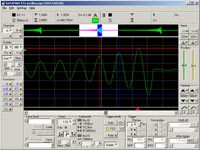
The software included with the Dataman scopes allows complete control of the device from a PC and contains all of the standard features expected in modern digital storage oscilloscopes (DSO) such as, hold acquisition process, hold-off, zoom. In addition the software offers saving/loading of waveforms for future use, export of data to clipboard, printing of results and scope settings. In order to keep the device functions up to date, the latest version of the software is always available on our website free of charge and runs in demonstration mode if no device is connected to the PC.
 |
 |
All basic oscilloscope controls are easily accessible directly from the main window making measurements familiar to that of a stand-alone device.
Most parameters can be set by dragging items on the main screen. Other controls such as timebase up/down can be controlled by a configurable hotkey. You can use two horizontal and two vertical cursors to perform any measurements on the waveform.
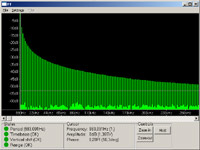
The software can automatically calculate 19 waveform parameters. The fourier transformation feature can be used for analysis of the frequency domain. The software automatically determines the waveform period and transforms just one period of the waveform. Alternatively, if manual mode is activated, you can select the data to be transformed. You can use inverse fourier transformations to simulate the waveform transition through a simple filter. The XY mode (Lissajous figures) is also included.
The software offers several export options:
- Internal Dataman format which can be opened in the software for comparison with measured data.
- ASCII file with options to configure format.
- Image with options to customise appearance and format.
- Measured data and protocol can be printed with options available to customise the layout.
Optional software packages are available to further increase functionality:
- Development Kit - allows you to write your own application using the oscilloscope
- Roll Mode - turns the oscilloscope into a data logger
- Spectrum Analyser - turns the oscilloscope into a spectrum analyser
Warranty/Support
The Dataman range of DSO’s are all covered by a 2 year warranty as standard. Software updates are available from our website free of charge, technical support is available via telephone and email, again free of charge.